No setup wizard.
Download the ZIP. Extract. Open Telephote.exe.
 Telephote.
PHONE WEBCAM FOR WINDOWS
Turn your iPhone into a Windows webcam — no installer needed on your PC. Just extract, open and connect by USB or Wi-Fi.
Portable on Windows. Unzip, open, connect.
No Windows installer.
No subscriptions. Ever.
A$5 once for iPhone Free Windows app
NEW Also on Linux: Ubuntu & Mint previewREADY FOR YOUR NEXT CALLTelephoteiPhone companionMADE FOR WORK COMPUTERS
Can’t install software on your work laptop? Telephote runs from an extracted folder, wherever portable apps are allowed.
Download the ZIP. Extract. Open Telephote.exe.
Run the portable Windows app as a standard user.
No separate .NET installation. Updates happen in the app.
Your organisation’s app and camera policies still apply. iPhone USB uses compatible hardware support already on the PC; local Wi-Fi is another option.
IPHONE SETUP ON WINDOWS
The iPhone app captures your camera. The portable Windows app receives it and makes it available to your meeting app.
Download Telephote on your iPhone. Open it and allow camera access.
iPhone download informationDownload the portable Windows ZIP, extract the whole folder and open Telephote.exe. There’s no Windows installer to run.
Get the Windows appConnect by USB or pair over local Wi-Fi. In Teams or another Windows camera app, choose the Telephote camera output.
Windows may list it as AvStream Media Device.CONNECT YOUR IPHONE
Keep it wired at your desk, or give your camera a little more freedom on the same local network.
USB uses the Apple USB hardware driver already present on compatible PCs. No Apple Devices app or service is installed by Telephote.
No links to copy. Wi-Fi pairing uses an encrypted local connection. Guest networks that isolate devices may prevent pairing.
MAKE THE SHOT YOURS
Choose the iPhone lens, adjust zoom and frame your shot from Windows. Keep the controls beside a live preview.
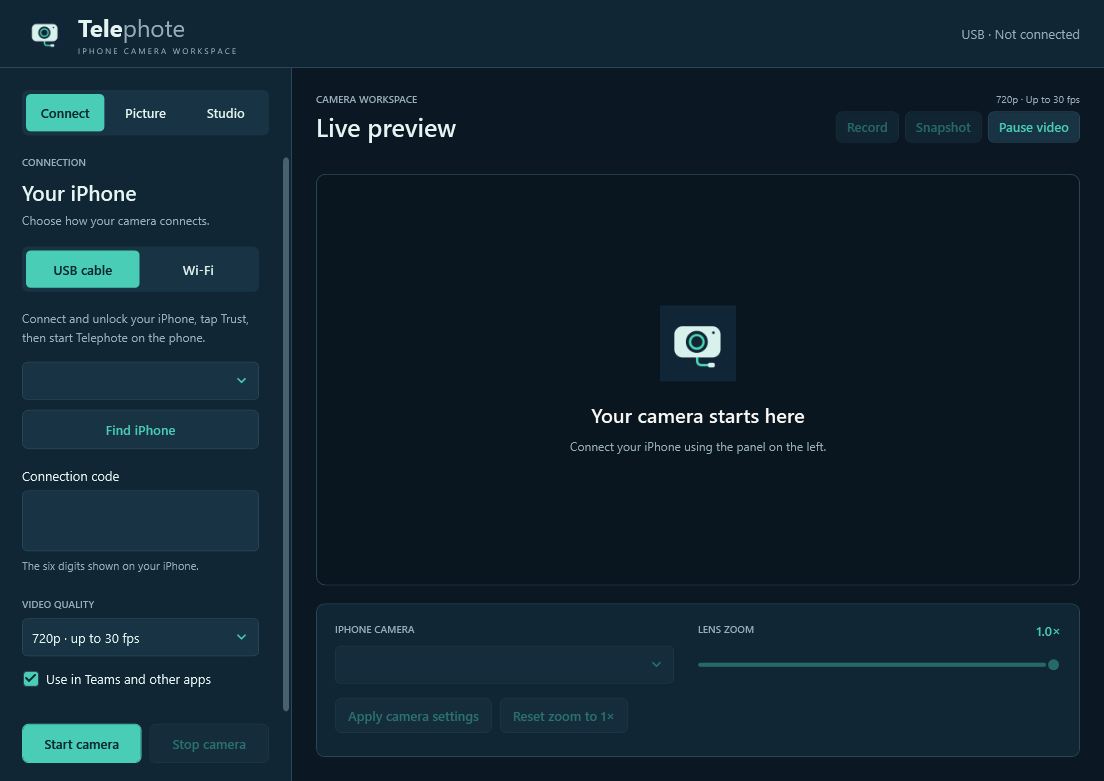
Switch available iPhone lenses and dial in the zoom from your PC.
Mirror, rotate, crop and adjust the picture to suit your setup.
Pause the video, take a snapshot or record video locally on Windows.
CHOOSE YOUR DOWNLOAD
For Windows, get the iPhone companion and Windows app below. Linux has its own preview download and setup guide. The desktop apps are free, with no Telephote subscription.
Your iPhone captures and sends the video to your PC. Pay once. No subscription.
Download the ZIP, extract the complete folder and run Telephote.exe.
Download free Windows ZIP Release notes & SHA-256 checksum ↗
NEW · LINUX PREVIEW
A separate portable app for Ubuntu and Linux Mint. iPhone and Android inputs. Your own controls.
Camera output needs an existing v4l2loopback device. iPhone USB uses an existing usbmuxd service. Telephote installs neither. Preview and recording work without a loopback device.
Release notes & SHA-256 checksum ↗ANDROID · SEPARATE TEST BUILD
Try a built-in USB webcam or a compatible Android camera app. Use this separate test build on Windows, or choose Android input in the Linux preview.
If your phone offers USB → Webcam, connect it with a data cable and choose it in Telephote. No Android companion is needed for this mode.
Use IP Webcam, DroidCam Classic or a compatible local MJPEG feed on the same network. Enter the phone’s IP and port in Telephote.
Free Windows 11 x64 ZIP · 0.3.1-android.2 · In-app updates included.
A FEW USEFUL DETAILS
The Telephote iPhone app costs A$5 (Australian dollars), paid once. The portable Windows app and Linux preview are free. There are no Telephote subscriptions or recurring fees. Both apps are needed for an iPhone webcam; the public iPhone download is coming soon. Third-party Android apps may charge separately.
The separate Android test build accepts a phone’s built-in USB Webcam mode or a local MJPEG feed from an Android webcam app, such as IP Webcam or DroidCam Classic. USB Webcam mode needs no phone companion. Network streaming needs a compatible phone app. Physical Android testing is still in progress. Read the Android setup guide.
Windows version 0.3.1 and the Windows Android test build include Updates → Check for updates. Download a newer matching version inside the app, stop camera and recording, then choose Restart & update. Users of older versions need to extract the updater-enabled ZIP once. Linux preview updates are manual: extract the new archive into a new folder. Read the update guide.
Yes, a separate free preview targets Ubuntu 24.04+ and Linux Mint 22+ on Intel/AMD 64-bit PCs. It includes iPhone QR pairing, existing usbmuxd USB support, Android MJPEG/UVC inputs, picture controls and recording. Meeting-app output needs an existing accessible v4l2loopback device. Ubuntu automated tests passed; physical phones, Linux Mint and live meeting calls still need testing. Read the Linux setup guide.
Yes. Extract the complete ZIP and run Telephote.exe from its folder. The Windows runtime is included. The iPhone companion is a separate app that needs to be installed on your phone.
Yes, Telephote makes its output available through Windows’ existing camera facilities. Enable “Use in Teams and other apps”, keep Telephote open and choose AvStream Media Device in Teams’ camera settings. Camera availability on a managed work PC still follows your organisation’s policies.
Only for Wi-Fi pairing. Both devices must be on the same local network; your PC can also be connected by Ethernet. A direct USB connection does not depend on the phone and PC sharing Wi-Fi.
USB needs a compatible Apple USB hardware driver already on the PC. Telephote doesn’t install one. You can use local Wi-Fi pairing instead when both devices can reach each other on the same network.
Telephote sends iPhone video directly to your computer over USB or encrypted local Wi-Fi. Android stream security depends on the phone app and protocol; plain HTTP MJPEG is unencrypted. Your meeting app handles the online call. Recordings stay in the location you choose on your computer.
Telephote carries video. Keep using your headset, laptop microphone or another microphone selected in your meeting app.